
QS - Encrypt Files Using 7-Zip (Windows) Download PDF
QUICKSTART GUIDE

Encrypt Files Using 7-Zip (Windows)

QuickStart Guide

Document Details

Document #: 160_QSG002_210816

Overview

This document outlines the steps to encrypt files using 7-Zip on Windows.

QR code — scan to download the latest version of this guide
Be sure to grab the latest version of this document here: https://links.crunchtime.com/QS-EncryptFilesUsing7Zip

OR by scanning the QR code to the left.

Encrypt Files Using 7-Zip (Windows)

  1. 1
    Download 7-Zip from following site: https://www.7-zip.org/
  2. 2
    Once downloaded, use File Explorer to navigate to where the files you wish to transfer are located.
  3. 3
    Right click on the desired folder/files.
  4. 4
    On the pop-up menu, hover over 7-Zip and select Add To Archive.
  5. 5
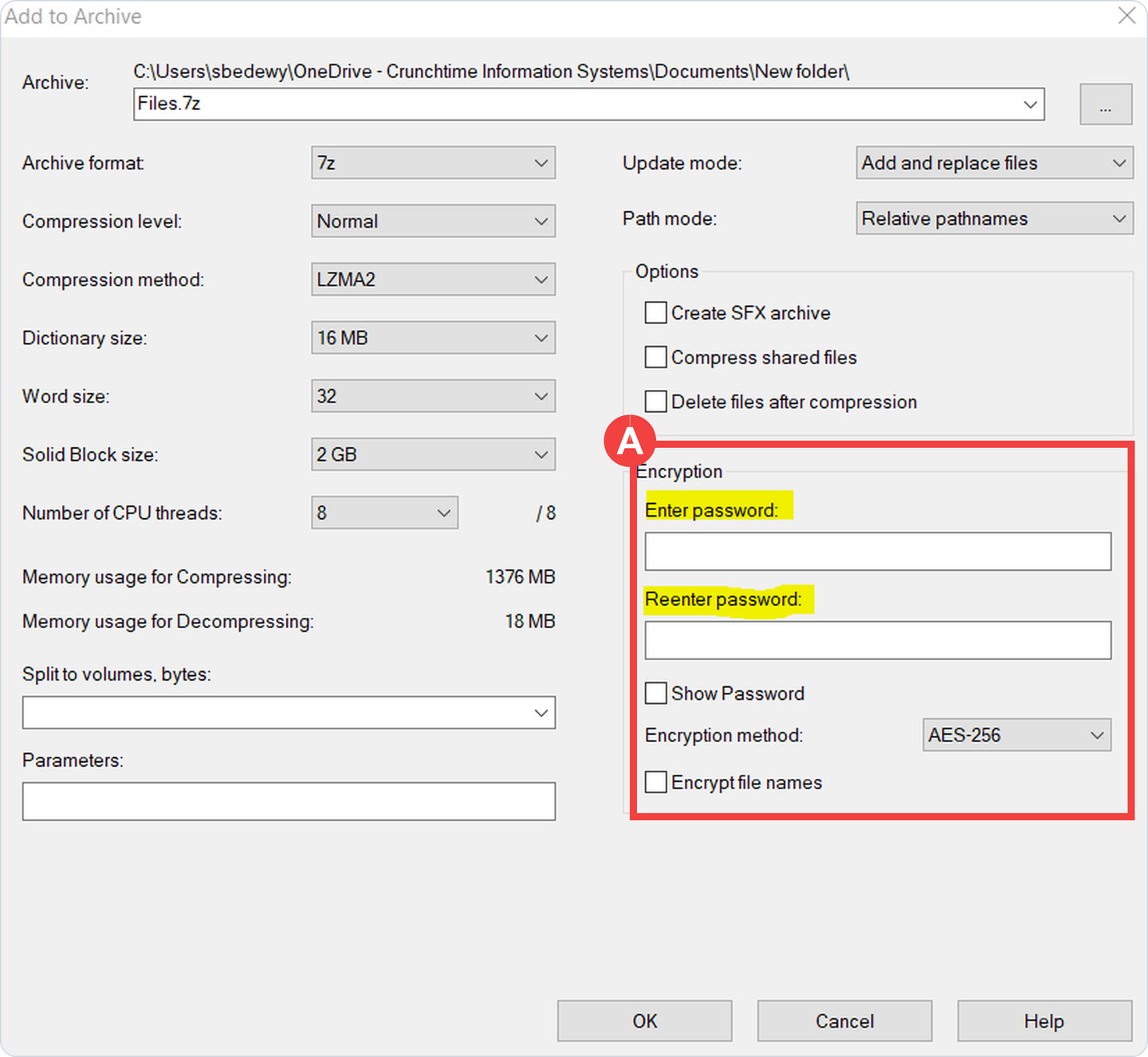
    The window below should open. Name the zipped file anything you wish.
Screenshot