EMSG - Create Attestation Clause Download PDF
SETUP GUIDE

Create an Attestation Clause

Setup Guide

Document Details

Document #: 160_ACSG_260504
Release Version: 20.26.04.30 or higher
Version Release Date: May 2026

Overview

This guide shows you how to create questions that are presented to employees at the start or end of their shift in Teamworx. We refer to these questions as Attestation Clauses.

QR code — scan to download the latest version of this guide
Download the latest version of this document here: https://links.crunchtime.com/EMSG-CreateAttestationClause

… or scan the QR code to the left.

Screen NameControl NameDescription
Attestation ClausesAdd/Delete/SaveAdd or delete an Attestation Clause, make and save changes to existing clauses.
Attestation ClausesViewAccess the screen in view-only mode.

Enterprise Manager

Create an Attestation Clause

Use Cases for Attestation Clauses

Getting Started

Enterprise Manager > Labor: Attestation Clauses
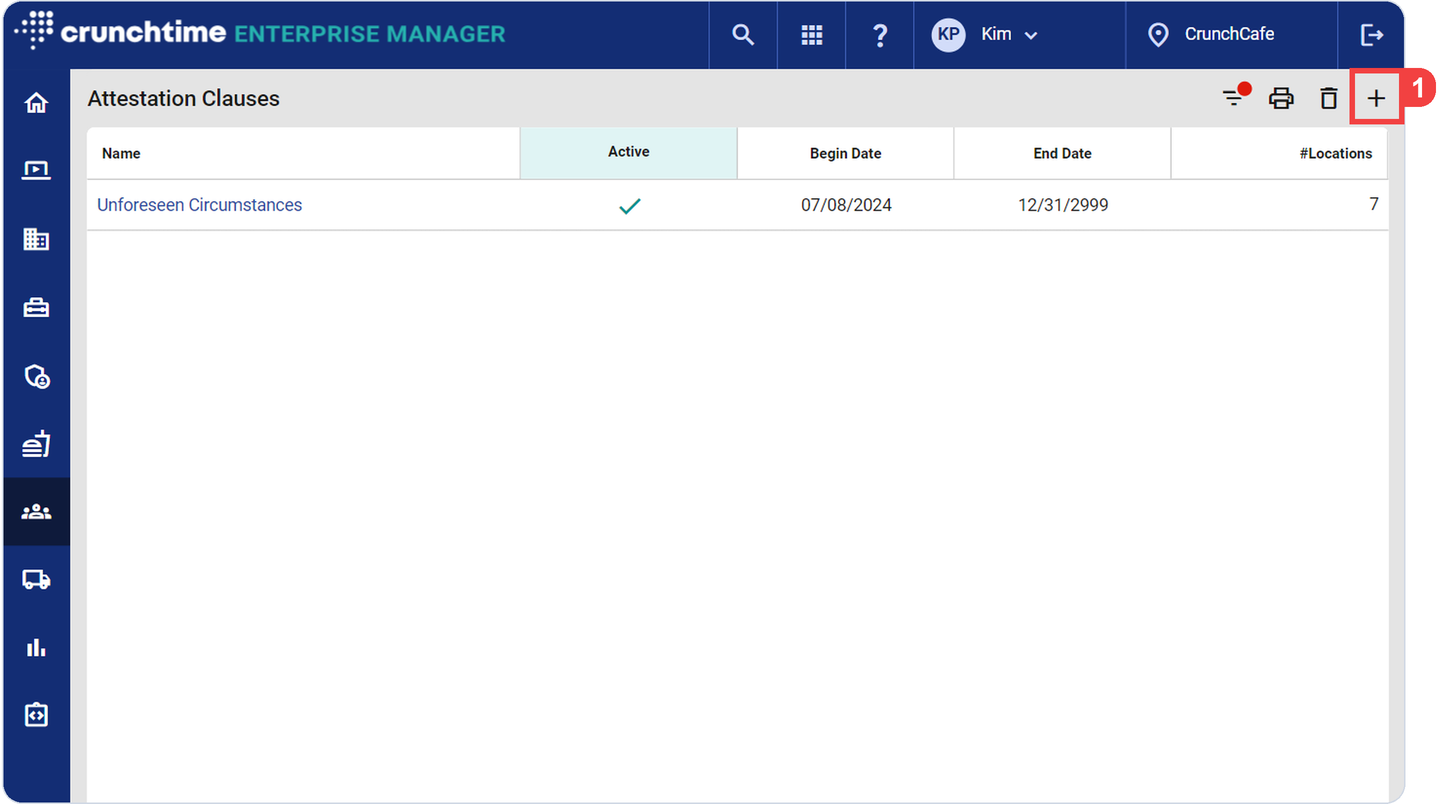
Screenshot: Enterprise Manager > Labor: Attestation Clauses
1

From the Attestation Clauses screen, select the Plus (Add) icon.
  1. 1
    From the Attestation Clauses screen, select the Plus (Add) icon.

Add Questions

Enterprise Manager > Labor: Attestation Clauses: Add
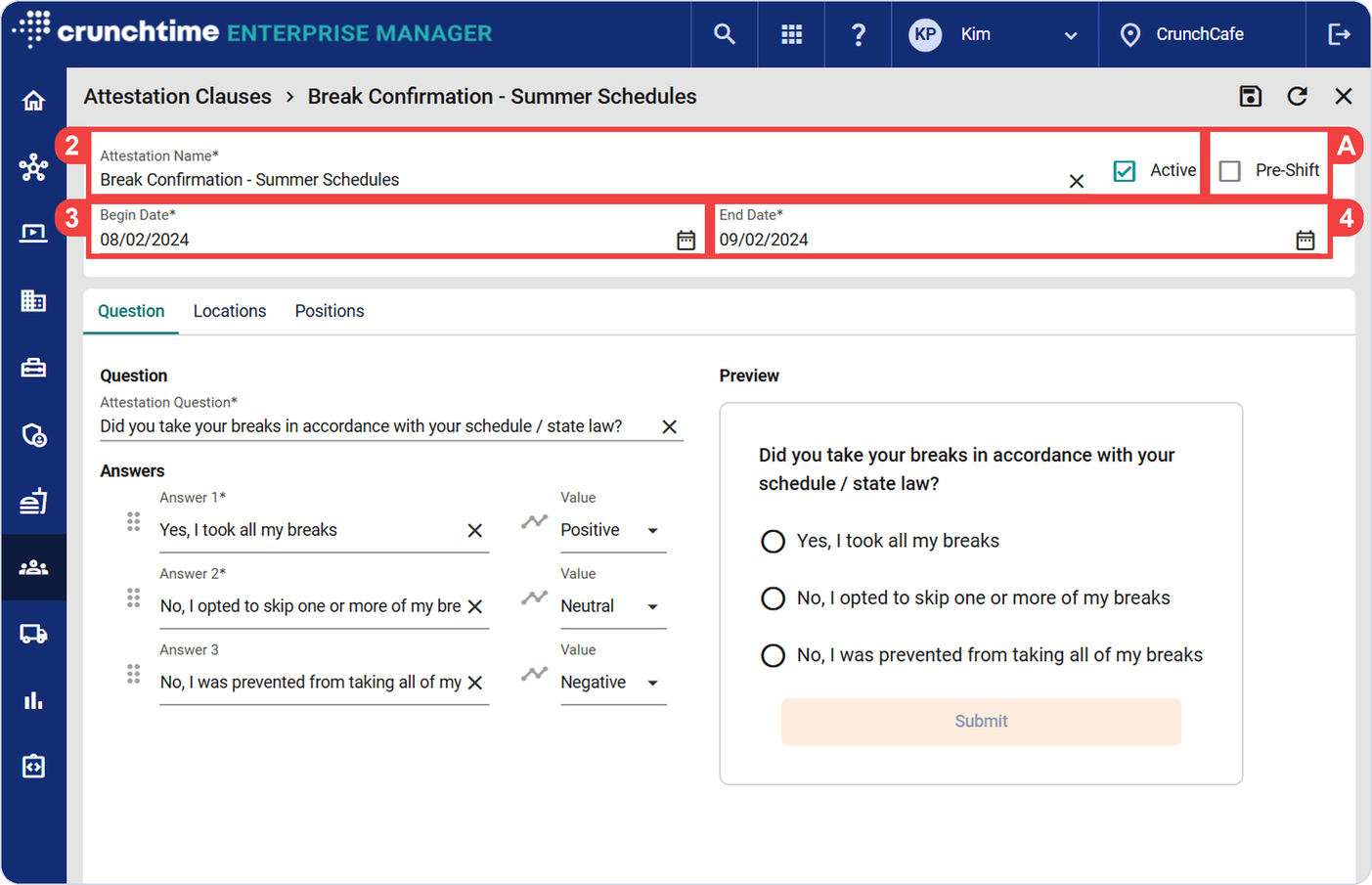
Screenshot: Enterprise Manager > Labor: Attestation Clauses: Add
2

Use the Attestation Name field to add a brief description.

3

Enter a Begin Date for when this question will go into effect.

4

(Optional) Adjust the End Date.

A

Pre-Shift – If not checked (default), this question will be presented to employees when punching out after their shift; check the box if the question should be presented to employees when punching in.

  1. 2
    Use the Attestation Name field to add a brief description.
  2. 3
    Enter a Begin Date for when this question will go into effect.
  3. 4
    (Optional) Adjust the End Date.
Note The End Date defaults to 12/31/2999, which is so far in the future it’s effectively “no end date”.
Enterprise Manager > Labor: Attestation Clauses: Add
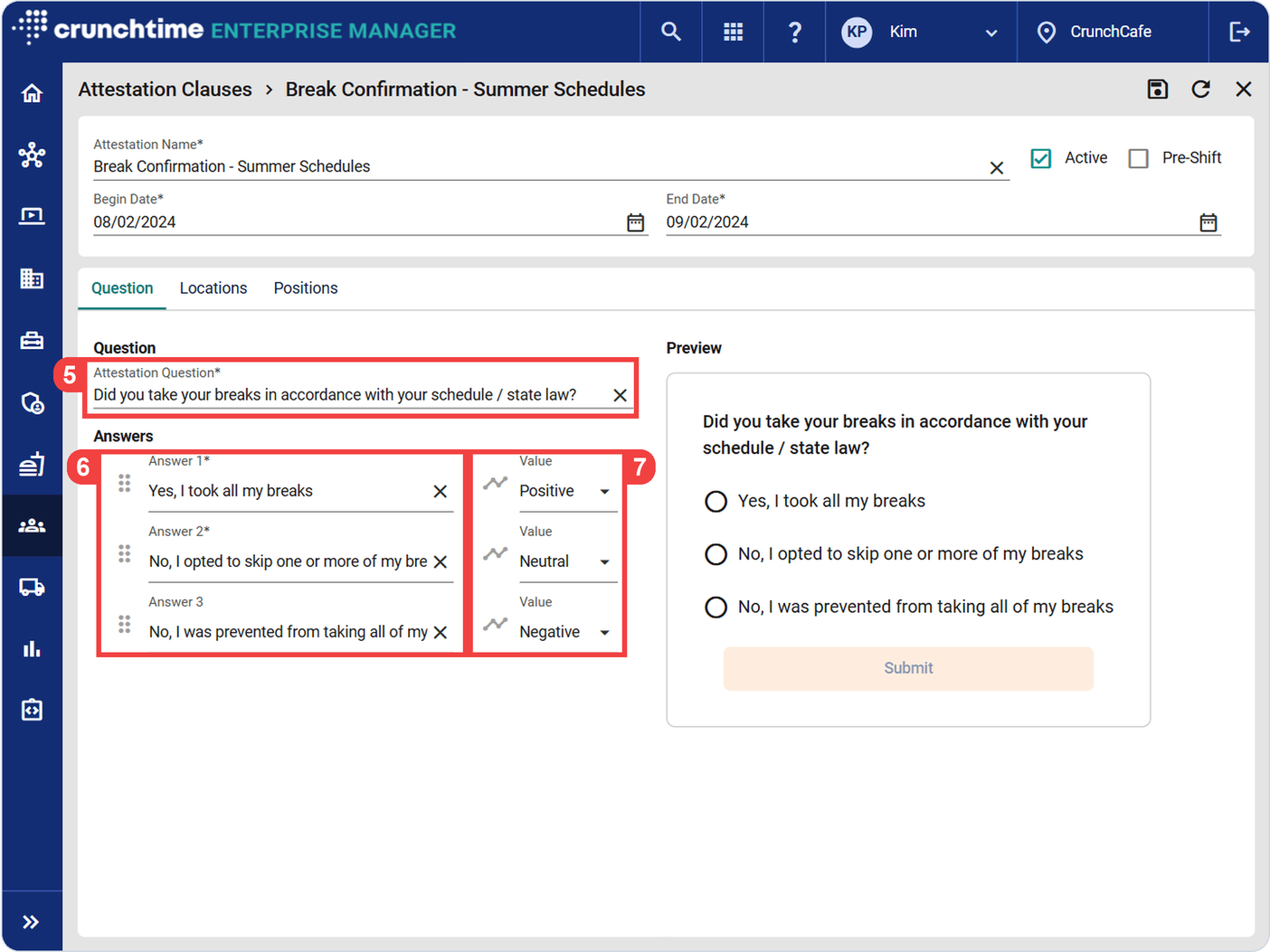
Screenshot: Enterprise Manager > Labor: Attestation Clauses: Add
5

Enter the Question you would like to ask employees at the end of their shift.

6

Add 2-3 Answers the employee can choose from.

7

(Optional) Set the Value to reflect if the answer is a Positive, Neutral, or Negative response.

  1. 5
    Enter the Question you would like to ask employees at the end of their shift.
  2. 6
    Add 2-3 Answers the employee can choose from.
  3. 7
    (Optional) Set the Value to reflect if the answer is a Positive, Neutral, or Negative response.
Tip A preview of the question and answers will appear on the right of the screen, so you’ll know exactly how it will appear in Teamworx.

Add Locations

Enterprise Manager > Labor: Attestation Clauses: Add
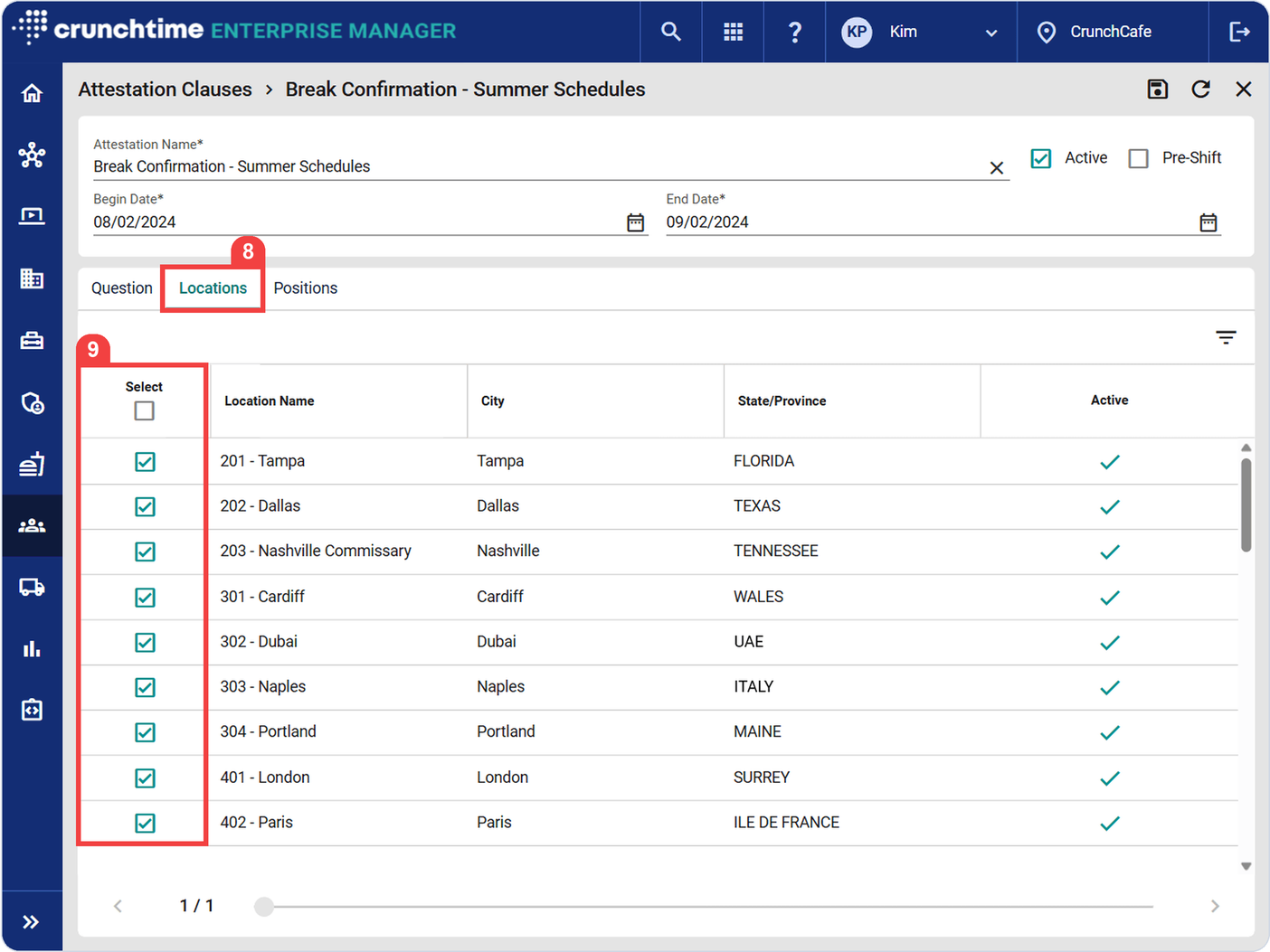
Screenshot: Enterprise Manager > Labor: Attestation Clauses: Add
8

Choose the Locations tab.

9

Check the Select box for each Location that should see this question, or check the box in the column header to choose them all.
  1. 8
    Choose the Locations tab.
  2. 9
    Check the Select box for each Location that should see this question, or check the box in the column header to choose them all.
Tip Want to make sure all locations in a particular region are asked this question?
Use the filter to see all locations in a certain City or State/Province!

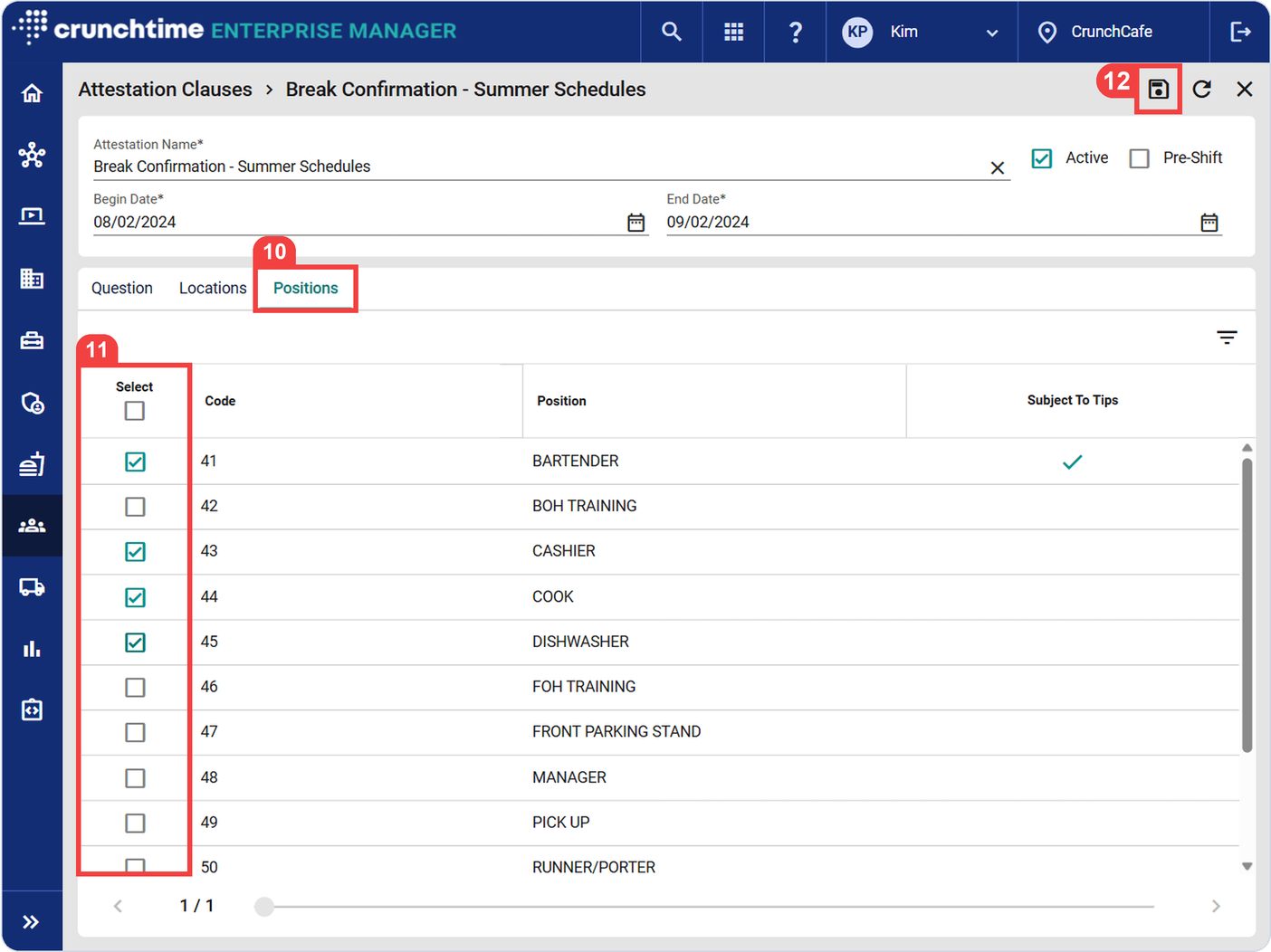
Add Positions

Enterprise Manager > Labor: Attestation Clauses: Add
Screenshot: Enterprise Manager > Labor: Attestation Clauses: Add
10

Select the Positions tab.

11

Check the Select box for each Position for which employees will have to answer this question, or check the box in the column header to choose them all.

12

Select the Disk (Save) icon to save the question.

  1. 10
    Select the Positions tab.
  2. 11
    Check the Select box for each Position for which employees will have to answer this question, or check the box in the column header to choose them all.
  3. 12
    Select the Disk (Save) icon to save the question.

FAQ’s

Q: Can employees opt out of providing feedback?

A: No, employees will be required to answer all questions they are asked at the end of their shifts.

A: Attestation Clauses are linked to a particular date, rather than a particular shift.

Q: Why is the Begin Date automatically changing to tomorrow’s date?

A: Users will only be able to set the Begin Date to today’s date when they are creating an Attestation Clause for the first time. Once a clause has been saved, the earliest Begin Date that can be saved for this clause is tomorrow’s date. This prevents any conflict between the updated clause and the question employees may currently be using to provide feedback.

Tip By toggling the filter to show “all” clauses, you will see an audit trail of all changes made to current and past questions.