
Be sure to grab the latest version of this document here:
https://links.crunchtime.com/EMQS-CreateCycleCounts
… or scan the QR code to the left.
Looking to count a limited set of products each week? Cycle Counts modify your count sheet to include only key products on the weekly Final for Post Inventory. Don’t forget, Cycle Counts also allow you to perform a full inventory count, including products like paper supplies or chemicals on a monthly or as needed basis.
… or scan the QR code to the left.
As designed, the application includes every Location Product on a Count Sheet. Using Cycle Counts allows you to replace your full inventory at Final for Post with a smaller list of products that excludes those you typically count less often (like paper supplies and chemicals).
The first step is to define the key list of Products that will be counted weekly.
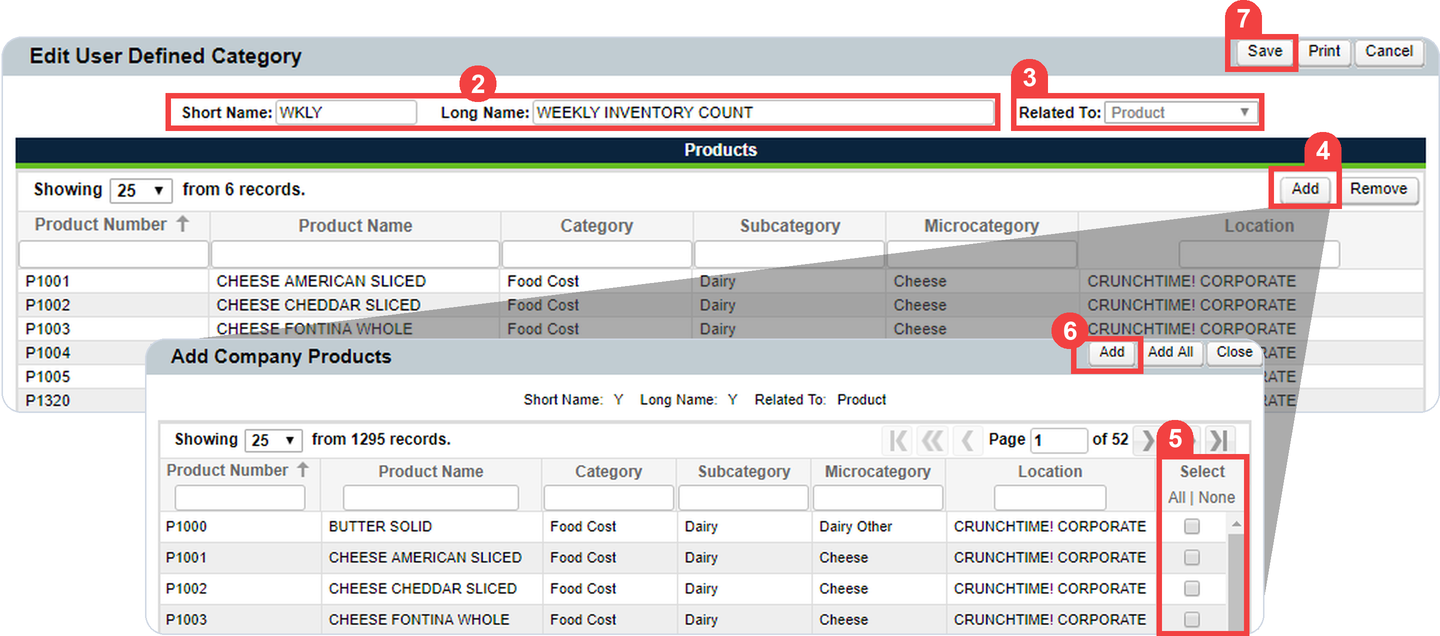
Enter a Short Name and Long Name. The Long Name will be used later when scheduling inventory, so name your User Defined Category (UDC) something meaningful.
From the Related To drop-down, choose ‘Product’.
Click Add to open a pop-up window listing all Company Products.
Check box in the Select column to add the Products you wish to count weekly. If necessary, Filter by Category (or other column) to locate all the Products you need.
Click Add to associate the Products with the UDC.
Don’t forget to Save!
Here’s the question: Which weeks do I count the important things and which weeks do I count everything?
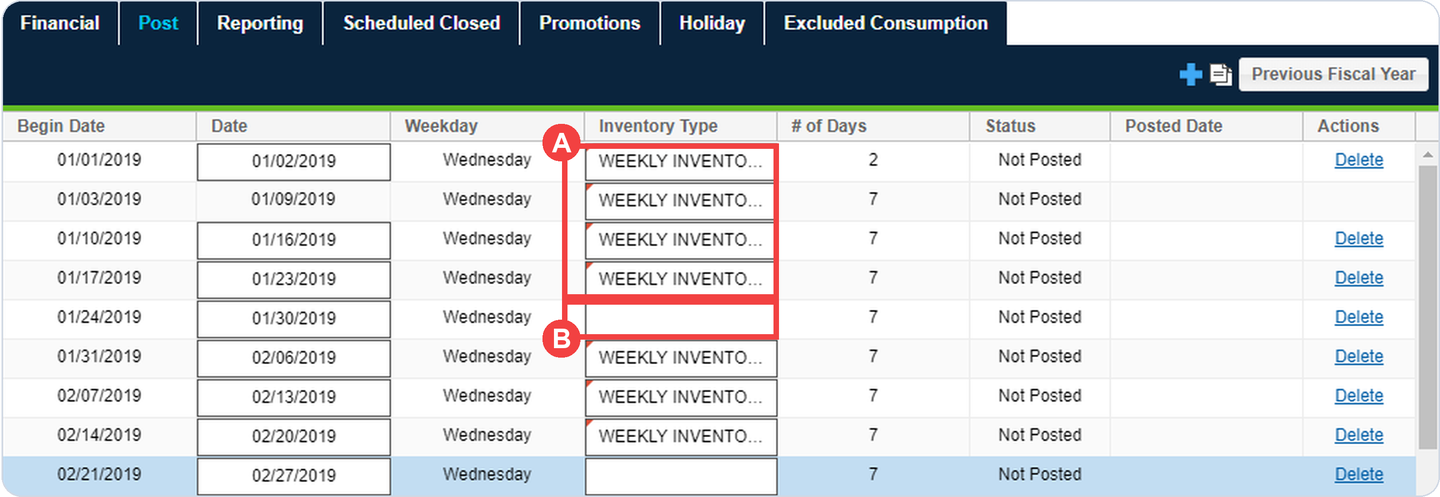
Cycle Inventory period (Count the important things): Apply the UDC you created as the Inventory Type for all weeks that you will count a limited group of Products.
Full Inventory period (Count everything): Leave the Inventory Type blank for all weeks that you will perform a full inventory count of all Products.

 > (Choose your Source & Destination Locations)
So what happens to the products I’m not counting?

Set your Secondary Closing Methods to ‘Book’ – This will ensure that even when Products like paper supplies are not present on the Count Sheet, the Book Quantity will carry over from week to week.
Setup is complete! Continue to the next page to learn what the Application User now sees in Net-Chef.

The “Detail” section of the Physical Inventory screen (outlined above) displays the Long Name of the UDC that was created on Page 2 of this document. This is how General Managers know that they are counting a limited group of Products.
If the “Detail” section is blank, the GMs will be performing a full inventory count of all products.
